> For the complete documentation index, see [llms.txt](https://connectyai.gitbook.io/documentation/llms.txt). Markdown versions of documentation pages are available by appending `.md` to page URLs; this page is available as [Markdown](https://connectyai.gitbook.io/documentation/usage-guides-enterprise-plan/chat-features/answer-components.md).
# Answer components
### Overview
Every analytical answer generated by Connecty AI is composed of multiple coordinated elements that together explain what was asked, how it was understood, and how the final result was produced. The Answer interface unifies these layers into a single, interactive view that allows both technical and business users to explore each stage of reasoning.
An answer in Connecty AI combines:
* A **natural-language insight** that communicates findings in clear business terms.
* A **set of interaction tools** for verification, feedback, and collaboration.
* A group of **technical tabs** (Chart, Table, SQL, Grammar, Metricverse) that display data, logic, and metadata behind the result.
* A **Steps** panel that details every reasoning step used to generate the query.
* A panel to customize **Data Quality** rules per query's output.
#### This article will describe in details each component of the answer flow:
1. **Answer Summary** – presents the interpreted question, key insights, system checks, and assumptions.
2. **Tabs and Views** – display the visual result, data table, SQL statement, logical graph, and Metricverse lineage.
3. **Query Inspector** – provides a step-by-step explanation of how the intent was translated into executable SQL.
4. **Top Toolbar** – gives quick access to verification, sharing, feedback, and follow-up actions.
This structure makes every answer transparent, reproducible, and collaborative. Users can read the summary to understand the result, inspect the SQL to validate it, visualize the logic through the Grammar graph, and verify data lineage through the Metricverse—all within one interface.
### 1. Key Elements of the Answer Summary
The **Answer Summary** is the first element displayed below the user’s question.
#### 1.1 AI Insights Summary
This summary presents the analytical insight in a clear, business-friendly sentence.
#### 1.3 Data Quality Issues
This section provides short, factual messages about potential issues or recommendations detected during the reasoning process. They are introduced with phrases like: *“Before you decide, please check:”*
System Notes may include:
* Missing joins or incomplete mappings between entities.
* Fields or tables that were inferred but not explicitly linked in the database.
* Suggestions for improving accuracy (e.g., “Join the nation table to map c\_nationkey to r\_regionkey”).
{% hint style="info" %}
These notes allow users to validate data relationships before trusting or reusing the SQL query.
{% endhint %}
#### 1.4 AI Assumptions
When certain relationships or dimensions are not explicitly defined in the schema, Connecty AI documents any inferred assumptions made during query generation.
For example: *“Regions are linked to orders via nation key, not directly; confirm this relationship is correct.”*
{% hint style="info" %}
The Assumptions section helps analysts understand how Connecty completed missing logical links or applied fallback reasoning.
{% endhint %}
***
Together, these components make the **Answer Summary** both descriptive and accountable. They provide users with an immediate overview of what the AI understood, how it executed the logic, and what requires validation before deeper inspection.
| **Benefit** | **Description** |
| ---------------------- | ------------------------------------------------------------------------------------------------------------------------------------- |
| Immediate Transparency | Gives users a clear snapshot of how Connecty AI interpreted the question, which assumptions were made, and how the logic was applied. |
| Actionable Validation | Highlights any missing joins and incomplete mappings that may need review before using the result. |
| Human-AI Collaboration | Bridges automated reasoning with human oversight, allowing users to verify and refine outputs directly in context. |
| Audit Readiness | Maintains traceability of reasoning, enabling quick audit of how the final SQL was derived. |
| Efficiency in Review | Summarizes all crucial details in one place, reducing the need to navigate across steps unless deeper inspection is required. |
### 2. Tabs
Below the answer summary, users can navigate through five tabs that represent distinct ways to explore and validate the generated answer. These tabs form the bridge between business interpretation and technical lineage.
***
#### 2.1 Chart
{% hint style="success" %}
Displays a visual representation of the answer results.
{% endhint %}
This view automatically formats aggregated data into bar, line, or pie charts, depending on the query type. It enables a fast visual check before switching to tabular or SQL views.
#### 2.2 Table
{% hint style="success" %}
Shows the raw query output in a structured table format.
{% endhint %}
Here each column corresponds to a returned field . It also supports sorting and quick filtering.
Additionally, it provides **column-level data quality statistics** of the result dataframe.
#### 2.3 SQL
{% hint style="success" %}
Displays the generated SQL statement that Connecty AI uses to compute the result.
{% endhint %}
Users can copy the code for verification or reuse in their connected data warehouse. Also, the SQL updates automatically whenever the semantic graph or natural-language instructions are modified.
Additionally, the **AI Editor** button allows users to open the current query directly in the AI Editor interface.
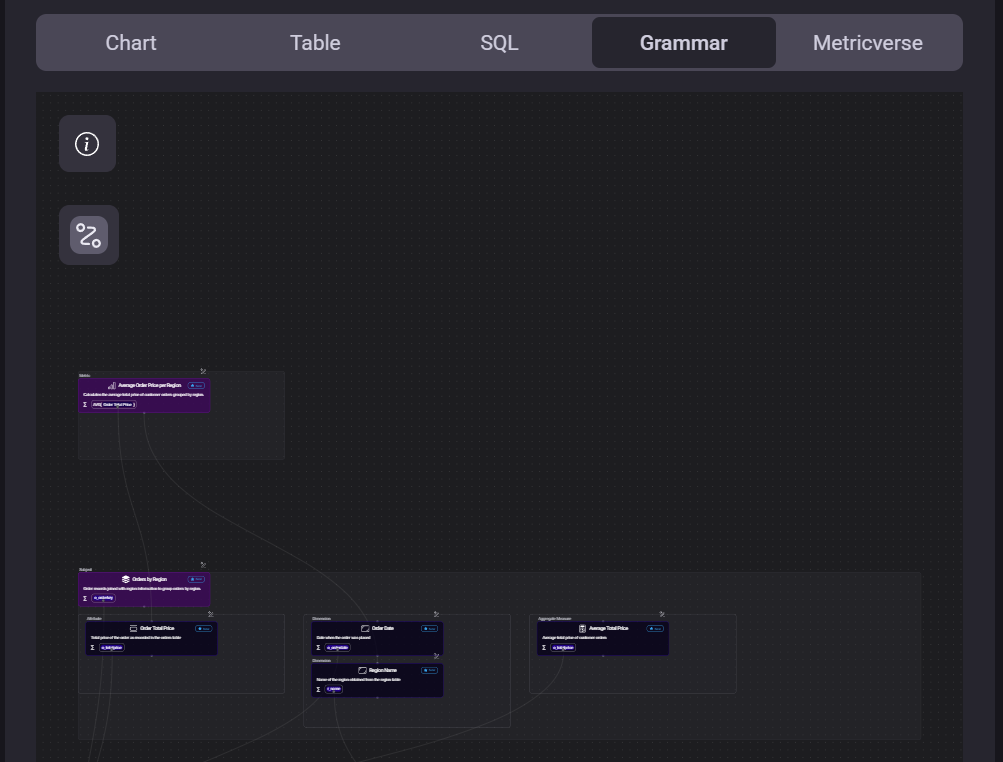
#### 2.4 Grammar
{% hint style="success" %}
Presents the semantic graph view, showing how Connecty AI structured the logical relationships that led to SQL generation.
{% endhint %}
Each node corresponds to a metric, dimension or filter, and links display joins or dependencies. This view enables clear tracing of analytical reasoning behind the query.
| **Benefit** | **Description** |
| --------------------------- | --------------------------------------------------------------------------------------------------------------------------------------------------------- |
| Semantic Transparency | Shows how Connecty AI interprets relationships between metrics, dimensions, and filters before SQL generation. |
| Logic Visualization | Allows users to explore entity dependencies and joins in a visual, graph-based format that mirrors the system’s reasoning. |
| Error Localization | Helps identify incorrect joins, missing relationships, or redundant connections visually before they affect the final SQL. |
| Interactive Refinement | Supports direct logic editing through the Add Instruction (🛠) button, powered by the SmartNode Editor for natural-language updates. |
| Learning and Debugging Tool | Provides analysts and developers with insight into Connecty AI’s internal decision logic, improving understanding and troubleshooting of complex queries. |
***
#### 2.5 Metricverse
{% hint style="success" %}
Offers a meta-level summary of the components used to produce the answer within the Metricverse framework.
{% endhint %}
Here we can visualize the number of Metrics, Subjects, Dimensions, Measures, Attributes and Filters involved. We can also differentiate them between:
* **New entities** – created uniquely for this question,
* **Reused entities** – drawn from the existing catalog
* **Verified entities** – validated against Metricverse definitions.
| **Benefit** | **Description** |
| ------------------------------ | ----------------------------------------------------------------------------------------------------------------------------------------------------- |
| Data Lineage Visibility | Reveals which metrics, dimensions, and relationships were reused or newly generated, ensuring transparency in query construction. |
| Governance and Standardization | Helps teams enforce consistent definitions and naming conventions across analyses through verified Metricverse entities. |
| Reuse Efficiency | Highlights components that are already defined within the Metricverse, reducing duplication and ensuring consistent calculations across projects. |
| Quality Assurance | Shows which entities are verified or unverified, allowing users to assess trust levels and prioritize validation efforts. |
| Knowledge Consolidation | Acts as a living inventory of the organization’s analytical logic — connecting data models, measures, and subjects into a unified semantic framework. |
## 3. Call-to-Actions
Positioned above every generated answer, the **Top Toolbar** contains collaboration, validation and inspection controls available for that specific response. It enables users to verify results, explore the underlying reasoning, share insights and continue analysis in a conversational flow, without leaving the answer view.
***
#### 3.1 Mark the Answer (Generated / Verified / Unverified)
By default, each response appears with the **Generated** label. From the dropdown, users can manually update the status to:
* **Verified** - marks that the answer and underlying SQL have been validated by a human reviewer.
{% hint style="warning" %}
When marked "Verified", the connected metrics, subjects and dimensions also inherit verified status in the Metricverse.
{% endhint %}
* **Unverified** - flags that the answer may contain incomplete joins, inferred assumptions or unresolved mappings.
Verification status helps maintain governance across collaborative workspaces, especially when multiple users review similar analytical questions.
***
#### 3.2 Query Inspector
{% hint style="info" %}
Refer [Answer Preparation Steps](https://connectyai.gitbook.io/documentation/usage-guides/chat-features/answer-components) for more details
{% endhint %}
This feature allows users to reopen and audit the full reasoning pipeline behind the answer - from intent detection to final SQL execution.
The panel includes two primary tabs:
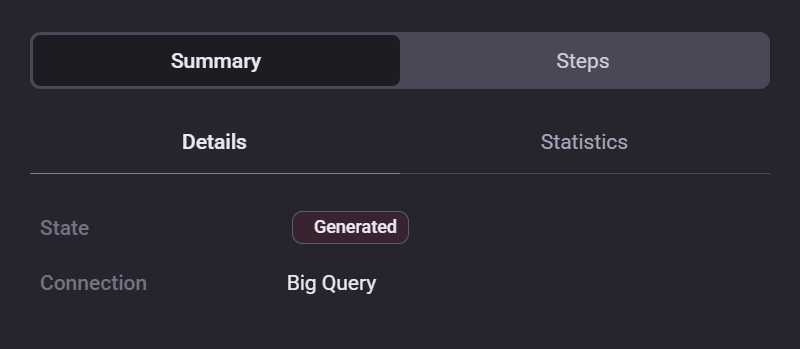
1. **Summary tab** – Provides a high-level overview of the query execution.
**Details** view shows the answer’s current state (e.g., Generated or Verified) and connection type (e.g., Big Query).
**Data Quality** rules per column
**Statistics** view lists runtime metrics such as rows returned, columns count, execution time (ms), data size (MB) and estimated duration. It also includes **Column Statistics** to display which fields were used in the result.
#### 3.3 Provide Feedback
The **Feedback** button lets users evaluate the accuracy, completeness, or readability of the answer. Submitting feedback contributes to continuous model improvement and assists administrators in monitoring data-quality issues or recurring interpretation gaps.
***
#### 3.4 Copy Link to Answer
The **Copy Link** button creates a shareable URL pointing directly to the selected answer card.It allows collaborators to review or comment on the same analytical output within their own workspace session.
***
#### 3.5 Reply (Follow Up)
Selecting **Reply** opens a text field below the existing answer, enabling users to continue the conversation in context. Follow-up questions automatically inherit the same dataset, schema, and reasoning chain — ensuring continuity without re-selecting sources or configurations.
***
{% hint style="success" %}
Together, these controls transform each answer into a collaborative, auditable artifact — allowing users to verify, share and iterate on insights directly within Connecty AI.
{% endhint %}